Showing posts with label computer. Show all posts

Saturday, April 18, 2015

College

Aaahh! It's April already! Time is moving so fast it's scary. College is really hard.
Why must the nicest weather of the year coincide with exam study time?
I wrote this up a while ago, and am just now posting it in between studying for exams. I've been doing nothing but math for the past 6 hours, and I need a brain break or I think my brain will break.
I realized the other day that I haven't really posted any pictures from college, so I'll make an attempt to rectify that from now on. First though, new computer setup!

Never seen that error before...


It's working pretty nicely. The main reason I'm running Windows is that the free version of Davinci Resolve (Davinci Resolve lite) only runs on Windows. From what I can tell, the paid version runs on Linux, but I don't have $1000 to spare, and since I'm a student, I get Windows for free, so...
I'm really excited for DaVinci Resolve 12, I'll probably move to that as my primary video editor. (except on Linux...) Resolve can even do real-time optical flow interpolation, which is the coolest thing I've seen in a while.

New system specs: (Subject to change fairly often)
CPU: 2.5 GHz Xeon x8
RAM: 20 GB ECC DDR2
GPU: Nvidia GTX 590
1 TB 7200 RPM SATA drive (Windows 7)
256 GB SATA SSD (Linux Mint)

So now I've got a good setup for CG and video editing, if only I had time to use it... I'm hoping to put it to use for the CRU VMA's next year. There are some nice computers in the video editing department at GMU, (i7 3770 with 16GB RAM), but they're rather lacking in terms of the GPU. (At least the ones I've tried, the mac pro computers may be better)


Anyway, photos!
Spring is beautiful.


 These are all raw, completely unedited, and some of them were taken with my phone. I did see enough good photo opportunities I've started bringing my camera. The Canon PowerShot G series is a really great all-around camera. It's small enough to bring easily, and still gives me all the control I need, and good photos. The new ones have HD video too. I'm very happy with my G10. I've put it through a lot, and it still delivers. I need to clean the lens though, as you can see in the photos above.
That's all for now.

Thursday, July 25, 2013

Dell CS-24SC servers

Dell CS24-SC:

Recently I discovered these servers on ebay. So far as I have been able to find out, the Dell CS-24SC was made by Dell for some undisclosed customer in large quantities. When they decided to upgrade, they flooded the market with these servers, and the prices show it. You can buy one of these with 8 GB of memory for about $140 (including shipping!) For a model with 16 GB of memory, the price goes up to the astronomical number of... about $165!

Image from ebay

Here are the specifications:

CPU: 2X Intel L5420 quad core @ 2.5 GHZ
SATA trays: 4, but make sure the seller includes them.
USB ports: 4 USB 2.0, 2 front, 2 back
Ethernet: 2X GBE + one for management
Video: Internal Intel chipset, 1X VGA (back)
Memory: Up to 48 GB DDR2 EEC

Some notes:

This is an incredible value. If you are going to build a renderfarm or compute cluster, it doesn't get any better than this. If you find a better deal, I want to see it!
It has a PCI-E slot, so you can add a better graphics card. It's single slot, so the maximum you could fit would probably be something like a GTX 640 (Though that starts to approach the cost of the server!) If you want more GPU power in something like this, you would probably have to go to liquid cooling.
 If you like this model, but need more memory, the Dell SC24-TY (oops, typo, Dell CS24-TY.) looks like the same model, but I've seen some specifications that indicate it will hold up to 288 GB of memory. (18 DDR3 slots, 18X16 GB=288) Those get expensive pretty quickly though.
I noted 16 GB maximum memory for the -SC model above, but I forget, it could be 24 GB.

Before getting this, I read some of the reviews (which are surprisingly scarce), and it was claimed to be loud. This is not the case. The fans spin up loudly, but once booted, they throttle down, and stay nice and quiet. I've got a Dell laptop right here that is louder than the server. The server also runs very cool, so the cooling is doing its job. I ran a smoke simulation in Blender for an hour, all cores at 100%, and it only got mildly warm. This was in a room with an ambient temperature of probably about 85 F.
If you're curious about how fast this is, here's a nice comparison chart:  http://www.cpubenchmark.net/cpu.php?cpu=Intel+Xeon+L5420+%40+2.50GHz&id=1259&cpuCount=2 This shows that it's a little slower than a modern desktop, but remember that the entire thing costs somewhere around half of what just the CPU of a new computer might cost! At the cost, scaling out over multiple servers is a good option too.

I've run Linux mint, FreeNAS, and Ubuntu Studio on it. Boot time is rather slow, but I haven't timed it. When using onboard graphics the X server sometimes has to be started manually with startx. I haven't had any such problems with a graphics card.

All in all though, if you're looking for power without the price, it doesn't get any better than this!

Monday, July 15, 2013

More good advertising

This is good advertising, at least in concept. The video is somewhat sub-par.


I guess this reduces the possibility of a leaking liquid cooling system ruining your motherboard/CPU.
My first thought is that the coating will trap heat, but I guess some silicone based coatings have decent thermal transfer.
It also makes open air cases more attractive, though I like the ASUS Sabertooth armor too.
Now I'm just waiting to hear of this for laptop motherboards!

Friday, June 28, 2013

Default Programs

When I install a new operating system, there is usually a set of default programs I want to install. Since I do this fairly frequently, (this may not be such a problem for many people!) it's nice when a distribution comes with most of the software I want so I don't have to go through a lot of installations. This is most noticeable on Windows, but many Linux distros come with a minimum of software too.

Enter Ninite!


What this website does is provide a single installation file to install multiple programs. You just select the programs you want, download the file, and install once!

Also, one of the really annoying aspects of some software installers is that they try to to install lots of junk software by default. (ASK toolbar for example) This website not only runs the installer automatically, it says no to the surplus extras!

It also detects whether the OS is 32 or 64 bit, and installs the right program version.

Want to update all the programs? Just run the file again! No matter when you made the installation file, all the programs will be up to date when they are installed.

Here are most of the Windows programs I like to install: (hyperlink)

Here's a file with most of the Linux programs I generally install (hyperlink)

If I remember I'll make a full list at some point.

Tuesday, May 21, 2013

EEC RAM

While reading through some operating system technical recommendations I came across this:

If the probability of an error is one in a hundred quadrillion, and if the memory system is running at 10 MHz (100 nanosecond), and if you have 125 Megabytes of RAM (1 billion bits), then you would expect on average to see one single-bit error every ten seconds and one double-bit error every thousand quadrillion seconds (somewhat more than the age of the universe). That is why ECC memory is worth using, and why it is designed to detect but not correct double-bit errors.

I'm not sure this is correct, but it is rather interesting. The rest of the page is here:
http://www.ohio.edu/people/piccard/mis300/eccram.htm
(Also note the date at the bottom!)

Wednesday, April 17, 2013

Transistor software

Note to self (and all interested):

Here's a piece of software that looks like it could be quite useful: http://en.transistoramp.de/
It works fine running on WINE too.

Tuesday, February 5, 2013

Corning and thunderbolt

It appears that Corning is making fiber optics. I didn't see this coming, but probably should have, considering the properties of certain glasses from them. This is very interesting.

Fiber optic connections are nothing new. They have been used for a long time in networking applications. Thunderbolt is trying to bring this to consumers, in a more appropriate price range. So far they have not done a very good job of this, Thunderbolt being available on a very select few computers, and only slightly more devices. That being said, it does have good potential if Intel can manage to make it more widespread by approving more devices and computers, .

The big breakthrough here though, (at least from my point of view) is the 0 bend radius on this cable!


While on the topic of data, transfer and storage;

Non-technical people tend to get a bit blasé about how it is now possible to store multiple HD feature films on things that you can lose in your pocket, but the reality is quite astonishing. Ten years ago, the idea that you might be able to back up an entire video project on something costing £25, and that you could accidentally drop in your cup of decaff latte would have seemed completely wild. In fact, if you'd dropped the decade-old equivalent on your coffee mug, it would have smashed it and the table as well.

Wednesday, January 23, 2013

Whole room projection

Every once in a while, Microsoft does come out with some neat things, and this is one of them:


It looks like a really cool idea, if they can get it to work and to market.

Monday, January 21, 2013

Computer building guide

Here's a short guide on how to build a computer. It's just an advertisement for Asus, but there's some good information nonetheless.
(This was posted partly just to test out the embed code)

Wednesday, January 2, 2013

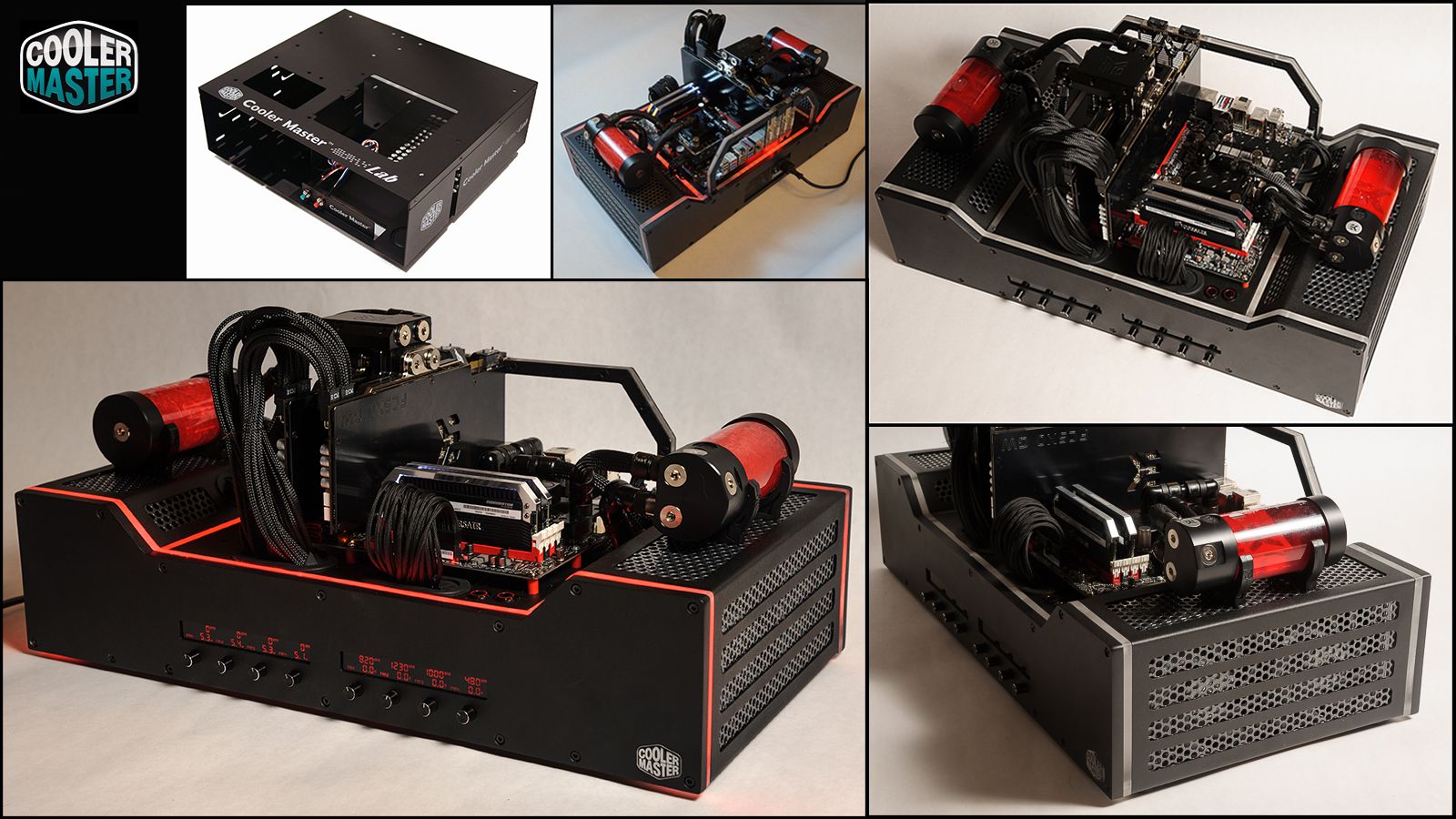
Really neat case mod

Here's an exceptional case mod from the Cooler Master competition (It won)


And here's a link about how he made it (always the most interesting part!)


Every once in a while I'm tempted to see what I could do with some of the old cases we have, but I'm just not really comfortable with having all the parts exposed like that, though it does look really neat.
(plus, watercooling is expensive!)

Thursday, November 1, 2012

The Story of a Shared Gmail Chat...


{3:17 PM John: We have not lost our power yet, but it has been flickering. Glad to hear yours is back. Kristie
3:18 PM me: I hope yours stays on. Do you have a generator?
 John: yup
3:19 PM me: That's good, we don't but our neighbor does. Right now I'm watching my Harvard computer lectures.
3:20 PM John: Good you can get school done when the power's on!
3:21 PM I did my BB work this morning which is good.
  Edit: BB computer work
 me: Actually, I downloaded the lectures to the laptop, so as long as I have battery left I can watch the lectures, which is nice.
3:22 PM I'm glad you were able to work on the Bible bee
  What computer work?
 John: Yeah. Battery on my laptop stinks. It has like a 6 minute life.
  Oh, I am typing all my cross references into quizlet
3:23 PM me: I added a external battery pack to this laptop, so I get a lifetime in the hours, which is great.
  Have you tried Anki? That's what I have to use for latin.
3:26 PM By the way, if you discharge a laptop battery below 40% it damages it.
 John: Translation please...
 me: for...?
3:27 PM John: last thing you typed.
  x-(
3:28 PM me: Most laptops have a battery status indicator. If is says 40% battery remaining (or less) than you are damaging the battery.
  Is that any help?
3:29 PM John: anki looks like it might be good, but since I already have typed 700 some crs into quizlet I think I'll stick to that.
  okay. that's what I thought you meant. So you should plug your computer in if it is at 40%?
 me: O.K. I like it because it's cross-platform, and you can share quiz sets
  yes
3:30 PM John: got to go. by
  cross-platform? shared across computers
 me: O.K., bye
 John: that was Mark
  ~Amy
 me: Who am I typing to ???
 John: Jessie
3:31 PM me: I'm starting to wonder here...
 John: nonono
  Kristie. truly
  Amy is telling you silly things.
  DONT LISTEN TO HER!!!!!!
  just we have 3 computers with gmail up and I'm trying to control Mark ~Amy
 me: O.K....
 John: I should get back to work now.
  Kristie
3:32 PM me: Me too, 73.
 John: FEAZLE DORP
  I enjoyed having this chat session. signed Kristie
  KRISTIE'S THE PROBLEM
  ~Amy
  Every weird thing stated is Mark aka Feazle dorp
  Its Amy
3:33 PM believe me
  Mark, quit!!!
  BY ~Mark
  Finally Marks off!!!
3:34 PM He is so annoying
 me: O.K., this was the most interesting chat I've had in a long time.
 John: that was Mark too.
 me: That's what I thought
 John: I am not off!!!!!
3:35 PM me: By the way, if you have three people typing to me, I have three people (Beth, Ethan and me watching this :D)
 John: next time dont fix Mark's copter. he keeps flying it into my head! x-(
3:36 PM me: So sorry, I taught him how to fix it on Sunday!
3:37 PM John: HEY I never flew it into your head!!!
 me: Wait.. is that how it got broken?
 John: as you can see, Mark easily gets bottled energy that he exudes on his sisters as they peacefully are walking through life.
  I didnt!!1
3:38 PM me: Oh yes, we don't have anything like that around here! ;)
3:39 PM John: That;s because Ethan's hair was sticking up last night!
  I might call Beth soon - Mark
  DONT LISTEN TO MARK
 me: You know he's watching this, right?
3:40 PM John: That is so off topic.
  ugh, Mark is making this all up himself. If you want to get any school done you might want to just close gmail completely except that you might find this too amusing. ~ actual Amy
  THAT IS NOT OFF TOPIC
 me: Who is off topic?!!!
 John: HER
  HIM
  Mark and Ethan of course.
  Kristie
  HER
  HEr
  HER
  Her
3:41 PM NOT ME
  Obviously the all caps things are Mark.
  her
  her
  her
  not me
  that is actual real live Amy
3:42 PM me: This has afforded quite a bit of amusement, but I really have to finish my Harvard computer class (next class: how to hack Google chat! ;), so goodbye.
 John: bye. Kristie
  BYYYYYYYYYYYYY
  Kristie's off

#include
{ 
Printf("
-------------------------------------------------------------------------------------------------------------------------------------------------------------------
Anyway, let that serve as an example to you!

By the way, a couple of notes: I changed all the names. I did some minor spelling/format corrections (I left 
most of it as typed), and, I was just kidding about the hacking as you can see from the ;). (Though I am taking CS50)
Also, the responses don't always line up with the questions, because I can only type so fast.

Enjoy!
-------------------------------------------------------------------------------------------------------------------------------------------------------------------
\n");
return 0;
}


Oops, sorry, too much C programming ;P

Saturday, September 22, 2012

2 KW motherboard

A while back I posted about a ridiculously large computer power supply. Alas, it was posted on April 1st.
This however was not posted on April first, and is really rather amazing.

This sort of marketing I enjoy;


I can possibly appreciate this somewhat more than most, having done a certain amount with electronics.
At around 2 volts, the percent of voltage drop can be appreciable, and with it comes heat. 

By the way, at the time of this post the motherboard has not been released. When it is, I think it likely the price tag may unfortunately scale with the power handling. It may not to a great degree, but I think it likely.

Wednesday, August 15, 2012

CPU benchmarking

A while back I posted a video about replacing my CPU cooler and overclocking my CPU. It's currently running at about 3.42 GHz. It was originally a 2.4 GHz CPU, so this is a substantial overclock, especially considering it's using a $20 air cooler! I have been testing it out and having fun with it, I downloaded SuperPi, and ran their benchmarks. Interestingly enough, I had the fastest Intel Core 2 Quad Q6000 series processor!

I ran both the 1M benchmark and the 32 M benchmark, and here's where they came int:

32 M: http://www.superpi.net/Scores/?action=searchScores&test=-12&vendor=&platform=&series=Core+2+Quad+Q6000+series&rpp=20

1 M: http://www.superpi.net/Scores/?action=searchScores&test=-7&vendor=&platform=&series=Core+2+Quad+Q6000+series&rpp=20


On the other hand, people with i7's and i5's are doing it in about half the time mine will, but that's a different matter. I did find it interesting that different CPU's with comparable clock speeds and memory could have such vastly different results. Another interesting thing to note was that my CPU was faster than the fastest AMD CPU! (It was a floating point test)

Tuesday, July 31, 2012

Interesting computer

One of the more unusual and coolest computers I've seen in a while:

final1

Click the picture to see more!

Tuesday, May 22, 2012

New CPU cooler!

I've been starting to overclock some recently, and was able to get my Intel Core 2 Quad (here's what it looks like by the way):

 up to a little under 3GHz, but with the stock cooler the temperatures were really higher than reasonable. During intensive rendering it would get to about 90 degrees Celsius, which is really just unacceptable. I looked around some, read a few reviews, went to the local Micro Center, and decided on the Cooler Master Hyper 212 Plus. The Intel Core 2 Quad has a LGA 775 socket, and this was listed to fit that socket (which helps ;) After unboxing I had some worries about it fitting into my case, it's much taller than the stock cooler, but it actually fit with room to spare, about an inch of clearance. Here's a photo of the stock cooler:

As you can see, it's pretty reasonable, but really unsuited for overclocking. Here's a photo of the current cooler:

Much bigger, better airflow, better cooling fins... But I'll get to that later.

First off, I had to remove the entire motherboard from the case. This pretty much involved unplugging just about everything. PCI-E cards, SATA drives, power cables, the whole lot. Once I had it out I noticed something unusual about the motherboard I hadn't remembered from when I installed it:
Yes, there are heatsinks on the back as well as the front, and yes, that heatsink is exactly where the CPU cooler mounting bracket goes. There's more though. I can't just take the big one off and let the improved CPU cooler take care of the excess heat, it's not quite that simple. Look below;


I don't remember if that heatsink is mounted on the northbridge or southbridge, for now I think let's say northbridge. Anyway, the heatsink on the back is what holds the heatsink on top down. Hm. Now it gets more complicated. I need to take the heatsink on the back off, because the large section is right where the CPU cooler bracket needs to go, but I can't remove the thing, because then the (northbridge?) would overheat. Some people would return the cooler. I decided to solve the problem myself. I have half of a heatsink that needs to be mounted, and half that needs to come off. The solution is obvious!


Yes, I really did, and yes, that was the heatsink on the back of my motherboard.


Above, the two halves.

It worked wonderfully! I mounted the small part, kept the large section for parts, and quickly and easily attached my new CPU cooler! I installed all parts, connected everything back up, and it worked, and well!
Here's what my computer now looks like inside:


That was a little more excitement than I had planned for just installing a CPU cooler, but lots of fun! (Hey, don't you wish at times that you could take a saw to your computer?) 

Currently:

Temps have only gotten above 60 C once so far (high of 61!) and it usually idles a little under 50 C. Temperatures usually vary less than 5 degrees from core to core, whereas before it might be as much as 10 degrees C. I'm very happy with it, it's working well, and not only is the cooling good, it's very quiet; it took me several days to get used to walking into the room and not being able to hear my computer when it was on!